Your forms are complex.
Getting help shouldn't be.

Gehtsoft Form Assistant uses AI to guide users through complex forms in real time. Reduce errors, cut support costs, and deliver a seamless experience.

5-minute setup Free trial available
AI-Powered
your-app.com/onboarding
Full legal name
Business entity name
Tax classification
Street address
0%
Fewer support tickets
Average across pilot customers
0x
Faster form completion
Compared to unassisted baseline
0%
First-time accuracy
Measured on complex tax forms
0 min
Integration time
Two lines of code to get started

Everything you need to eliminate form confusion

A lightweight widget that understands your forms, speaks your users' language, and answers questions before they become support tickets.

Contextual AI answers

The assistant understands every field on your form and delivers precise, context-aware explanations in plain language.

Any form, any platform

Works with web forms, fillable PDFs, and custom UIs. One script tag is all it takes to add intelligent guidance.

Multilingual out of the box

Users ask questions in their preferred language and get answers in the same language. No configuration required.

Enterprise-grade security

API key authentication, rate limiting, input sanitization, and full audit trail. Your data stays under your control.

Instant deployment

Cloud-hosted with zero infrastructure to manage. Get a working assistant in minutes, not weeks.

Developer-friendly API

RESTful endpoints, customizable system prompts, and full white-label capability for seamless branding.

<script src="https://cdn.gehtsoft.com/form-assistant.js"></script>
<script>FormAssistant.init({ apiKey: 'your-key' });</script>

Three steps to smarter forms

Get up and running in minutes, not weeks. No backend changes required on your side.

1

Send us your forms

Share your forms with us. We handle configuration, AI training, and hosting.

2

Embed one script tag

Add a single JavaScript snippet to your page. Configure colors and behavior to match your brand.

3

Users get instant help

When users click a field or ask a question, the assistant responds with accurate guidance in real time.

See it in action

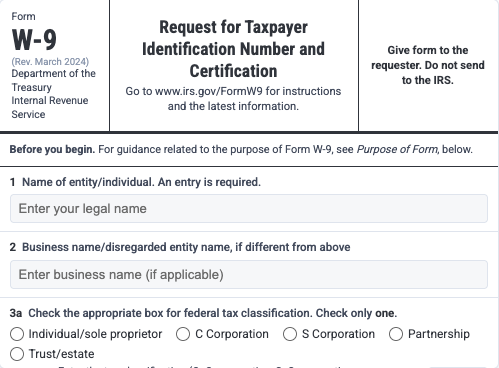
This is a real, working instance. Click any field label or open the assistant to ask a question about the W-9 form.

Click a field label Ask "What is a TIN?" Try "Am I a C-Corp or S-Corp?"
Live
your-company.com/onboarding/w9
Form W-9 (Rev. March 2024) Department of the Treasury
Internal Revenue Service

Request for Taxpayer
Identification Number and Certification

Go to www.irs.gov/FormW9 for instructions and the latest information.
Give form to the requester. Do not send to the IRS.
Before you begin. For guidance related to the purpose of Form W-9, see Purpose of Form, below.
1 Name of entity/individual. An entry is required. (For a sole proprietor or disregarded entity, enter the owner's name on line 1, and enter the business/disregarded entity's name on line 2.)
2 Business name/disregarded entity name, if different from above
3a Check the appropriate box for federal tax classification of the entity/individual whose name is entered on line 1. Check only one of the following seven boxes.
Enter the tax classification (C=C corporation, S=S corporation, P=Partnership)
4 Exemptions (codes apply only to certain entities, not individuals; see instructions on page 3):
(Applies to accounts maintained outside the United States.)
3b If on line 3a you checked "Partnership" or "Trust/estate," or checked "LLC" and entered "P" as its tax classification, and you are providing this form to a partnership, trust, or estate in which you have an ownership interest, check this box if you have any foreign partners, owners, or beneficiaries. See instructions.
5 Address (number, street, and apt. or suite no.). See instructions.
Requester's name and address (optional)
6 City, state, and ZIP code
7 List account number(s) here (optional)
Part I Taxpayer Identification Number (TIN)
Enter your TIN in the appropriate box. The TIN provided must match the name given on line 1 to avoid backup withholding. For individuals, this is generally your social security number (SSN). However, for a resident alien, sole proprietor, or disregarded entity, see the instructions for Part I, later. For other entities, it is your employer identification number (EIN).
Social security number
or
Employer identification number
Part II Certification

Under penalties of perjury, I certify that:

  1. The number shown on this form is my correct taxpayer identification number (or I am waiting for a number to be issued to me); and
  2. I am not subject to backup withholding because (a) I am exempt from backup withholding, or (b) I have not been notified by the IRS that I am subject to backup withholding as a result of a failure to report all interest or dividends, or (c) the IRS has notified me that I am no longer subject to backup withholding; and
  3. I am a U.S. citizen or other U.S. person (defined below); and
  4. The FATCA code(s) entered on this form (if any) indicating that I am exempt from FATCA reporting is correct.
Sign Here

Built for enterprise. Ready for production.

Security, performance, and flexibility at every layer.

Security & Compliance

  • SOC 2 ready architecture
  • API key authentication
  • Complete audit trail
  • Input sanitization & rate limiting

Technology

  • LLM-powered, context-aware responses
  • Sub-second response times
  • 99.9% uptime SLA
  • Configurable AI behavior

Integration

  • Works with any web framework
  • PDF viewer support
  • REST API & WebSocket
  • Full white-label capability

Built for complex, high-stakes forms

Wherever form accuracy matters, Form Assistant reduces errors and eliminates the need for manual guidance.

Client onboarding

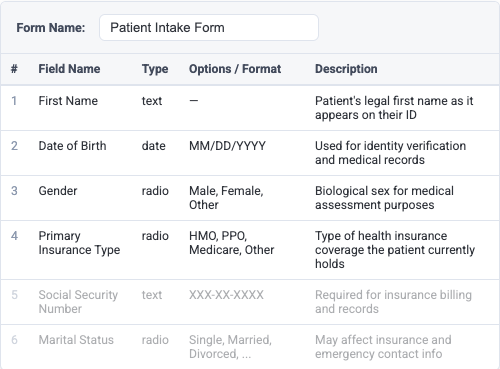
Guide new clients through KYC, compliance, and intake forms with confidence and zero back-and-forth.

Healthcare intake

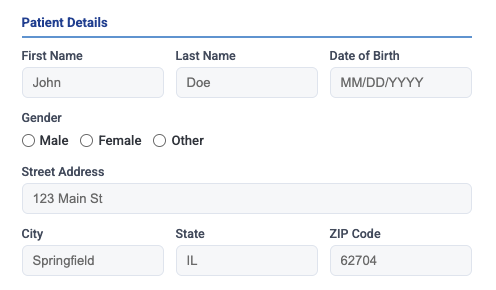
Patients complete insurance and medical history forms accurately on their first attempt.

Financial services

Tax forms, loan applications, and account openings completed correctly with real-time guidance.

Government & regulatory

Customs declarations, permit applications, and compliance filings with built-in validation guidance.

HR & employee onboarding

New hire paperwork, benefits enrollment, and tax withholding forms completed without HR intervention.

Frequently asked questions

How does the assistant understand my specific form?

We analyze your form structure, field labels, and any associated documentation to build a context model. The AI uses this model along with its broad knowledge to provide accurate, form-specific guidance for every field.

What languages are supported?

The assistant automatically detects the language of the user's question and responds in the same language. It supports 50+ languages including English, Spanish, Mandarin, French, German, Japanese, Korean, and more.

How is my data kept secure?

All communication is encrypted in transit. We use API key authentication, per-tenant data isolation, input sanitization, and rate limiting. Your form data and user interactions are never used to train models.

How long does integration take?

The basic integration is two lines of code and takes under 5 minutes. For custom styling, behavior, and form-specific configuration, most teams are fully deployed within a day.

Can I customize the widget's appearance?

Yes. You can customize colors, text, positioning, and behavior through configuration options. The widget supports full white-label branding to match your application's design system.

What happens when the AI doesn't know the answer?

The assistant is trained to acknowledge its limitations rather than guess. It will direct the user to consult official documentation or contact support when it cannot provide a confident answer.

Is there a free trial?

Yes. We offer a free tier so you can evaluate the product with your own forms before committing. No credit card is required to get started.

Start Free

Get started with our free tier. Evaluate with your own forms, no commitment required.

Try the live demo

Custom Solution

Need enterprise features, custom AI training, or dedicated support? Let's talk.

Book a Demo
Typical response within 24 hours

Questions? Reach us at contact@gehtsoftusa.com

Admin login